
Features
Everything you need on a drawing set. Nothing you don't.
Redpen covers review, measurement and takeoff end to end, and keeps the screen calm while you work.
A-101 First Floor Plan
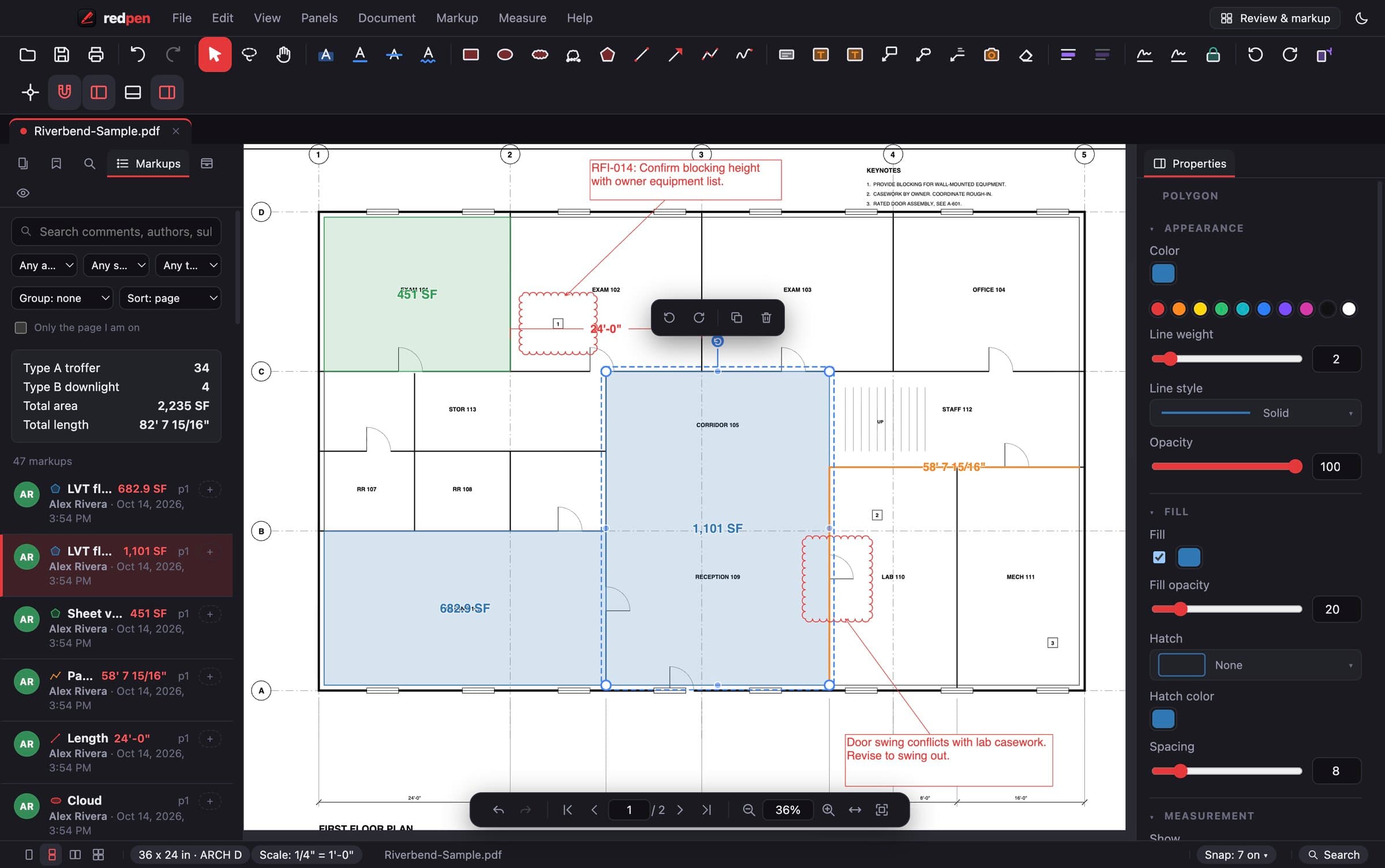
Review & markup
Markups that read clearly on screen and on paper.
- Clouds and cloud callouts
- Revision clouds by box or by points, with or without a leader.
- Callouts and arrows
- Text boxes with leaders that stay attached when you move them.
- Text, highlight, strikeout, underline
- Mark up the drawing text itself, or type anywhere.
- Shapes and pen
- Rectangles, ellipses, polygons, lines, polylines and freehand.
- Markups list
- Every markup with author, date, status and comments. Filter, sort, group, export.
- Tool chest and format painter
- Save your go-to markups and copy a style from one markup to many.
- Group, align, distribute
- Line markups up and move sets of them together.
Scale
Get the scale right once, and every number after it is right.
- Autoscale
- Reads the dimension strings on the sheet, finds the lines they label and votes on the true scale. Works on reduced prints where the scale note is wrong.
- Autoscale an area
- Point it at one viewport when a sheet has details at different scales.
- Calibrate
- Click two points, type the real distance. Done.
- Presets
- Architectural, engineering and metric scales, per page or for the whole set.
Measure & takeoff
Real-unit quantities that update as you draw.
- Length and polylength
- With dimension-style labels you can pull off the line.
- Area, perimeter, volume
- Plus cutouts for openings, and a depth for slabs and footings.
- Wall area
- Draw the run, set the height, get the square footage.
- Angle, radius, diameter
- For the odd geometry.
- Snapping
- Snap to line ends, midpoints and intersections on vector PDFs.
- Takeoff totals
- Group by subject or page with running totals in the side panel.
Count
Fixtures, devices, piles, anything with a symbol.
- Count tool
- Numbered markers by group: Type A troffer 1, 2, 3...
- AutoCount
- Click one symbol and Redpen finds and numbers every match on the sheet.
- Export
- Counts go to Excel with everything else.
Document tools
The PDF chores, without a second program.
- Insert, extract, rotate, delete pages
- Build the set you actually need to send.
- Edit text
- Fix a typo in the PDF itself.
- OCR
- Make scanned drawings searchable.
- Redaction
- Remove content for good, not just cover it.
- Bates numbering and stamps
- For submittals, closeout and claims.
- Sheet overlay
- Compare two revisions on top of each other.
- Digital signatures and watermarks
- Sign pay apps; mark sets DRAFT or VOID.
- Flatten
- Burn markups into the page when the file has to be final.
Make it yours
Set it up once, the way you work.
- Bluebeam-style shortcuts
- On by default, so your muscle memory still works. Remap anything.
- Customizable toolbar
- Arrange and hide tools; workspaces for review or takeoff.
- Themes
- Dark, light, dimmed and high-contrast.
- Command bar
- Type the name of any command and run it.
- Recovery
- Auto-saved work comes back after a crash.
- Updates on your schedule
- Install updates when you are ready, not mid-markup.
Put Redpen on your next bid set.
14 days of every feature. No credit card. If it doesn't save you time on the first set, don't keep it.