Compare sets
Find what changed in the new set.
When a revised set comes in, Redpen reads the sheet numbers, pairs each new sheet with the old one, and checks each pair for what was added or taken out in the drawing and the text.
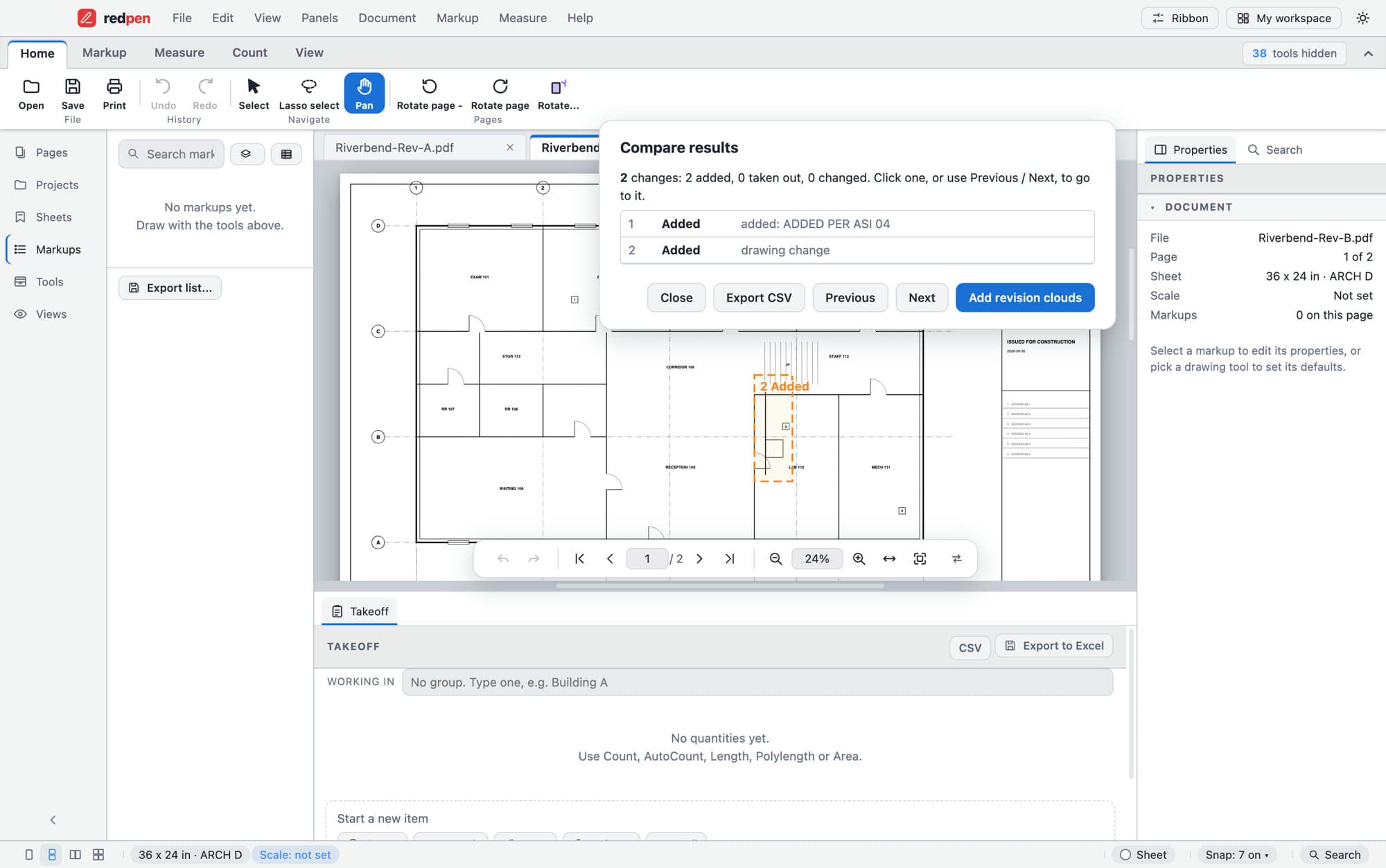
Compare results for one sheet pair
S-04.1What it doesPro
What it does.
- Pairs sheets by number
- A-201 is compared with A-201, even when the new set adds, drops or reorders sheets. If a sheet has several revisions in the set, the highest one wins, and revision tags like R3 or ASI5 are ignored when matching.
- Overlay
- Lay the old and new sheet on top of each other and see the difference by eye.
- Revision clouds
- Put a cloud around each change with a note, as ordinary markups you can edit and send on.
- A change list
- Step through every change with Previous and Next, and export the list to CSV.
S-04.2How it goes
Comparing a revised set.
- 01Open both sets
Open the new set, and the previous one in another tab.
- 02Compare sets
Choose Compare with an older set. Redpen pairs the sheets and shows them in a table.
- 03Check for changes
Redpen checks one pair at a time. Click a row to step through its changes and cloud them.
S-04.3Also
What set compare handles.
- Shows added, removed and unmatched sheets
- Lines up scale and rotation, or align by hand
- Finds changes in linework and in text
- Slip sheets drop an addendum into the set; markups carry across when the sheet size matches
S-04.4Limits
What it does not do.
- Compare is picture-based. It lists where the linework and the text differ between two sheets, not what the change means.
- Sheets are paired by the sheet number Redpen reads from each one. Sheets it can't match are listed as unmatched.
- Changes in text are listed when both sheets have a text layer.
S-04.5Questions
Compare drawing sets: short answers.
How does Redpen know which sheets go together?
It reads the sheet number on each sheet and pairs the old and new sheet with the same number. If a sheet has several revisions in the set, the highest one wins.
Is overlay the same as compare?
Overlay lays the two sheets on top of each other so you can see the difference by eye. Compare finds each change and lists it. Redpen does both.
Is comparing drawings free?
Comparing one page with an older version is free. Comparing whole sets and sheet overlay are Pro.
Come on in. The viewer is free.
Download Redpen and open your first PDF in a minute. The free app needs no account. Every new account can try Office or Pro free for 14 days, no card.
Windows & Mac · No credit card · Your files stay on your computer