Take off the bid. Track every addendum.
Open the set, scale it, measure and count it, send the quantities to Excel, then check each addendum against the set you priced. One desktop app for Mac and Windows, working on PDFs.
Windows & Mac · No credit card · Your files stay on your computer
Who opens it every day.
Redpen works on PDF drawing sets. It is for the people who price them, run them and build from them.
Estimators and precon
Autoscale the bid set, AutoCount the devices, take off every room and export the totals to Excel. Perimeter and Dynamic Fill are in the same plan as length.
PMs and project engineers
When Addendum 3 drops, compare it with the current set, cloud what changed and slip the new sheets in. RFIs and markups stay in one list with status and comments.
Superintendents and foremen
The current set on a laptop in the trailer, linked sheet to sheet and working offline. Mark it up in the field and send it back to the office.
Trade contractors
Electrical, mechanical, plumbing, drywall: count your devices, measure your runs, price your scope, and open the marked-up set the GC sends over.
From the open set to the quantities.
Shown on the two-sheet Riverbend sample set, which you can download from the Download page and follow along.
- 01
Open the set
Open the PDF from your own disk, however big. Redpen reads the sheet size and tells you when the scale isn't set, so nothing is measured until it is.
- Open any PDF, any size · Folders, recent files and synced cloud folders, opened from your own diskFree
- Views, zoom, split view, rulers and gridFree
- Find text, with whole-word and pattern search · Also searches a folder of PDFsFree
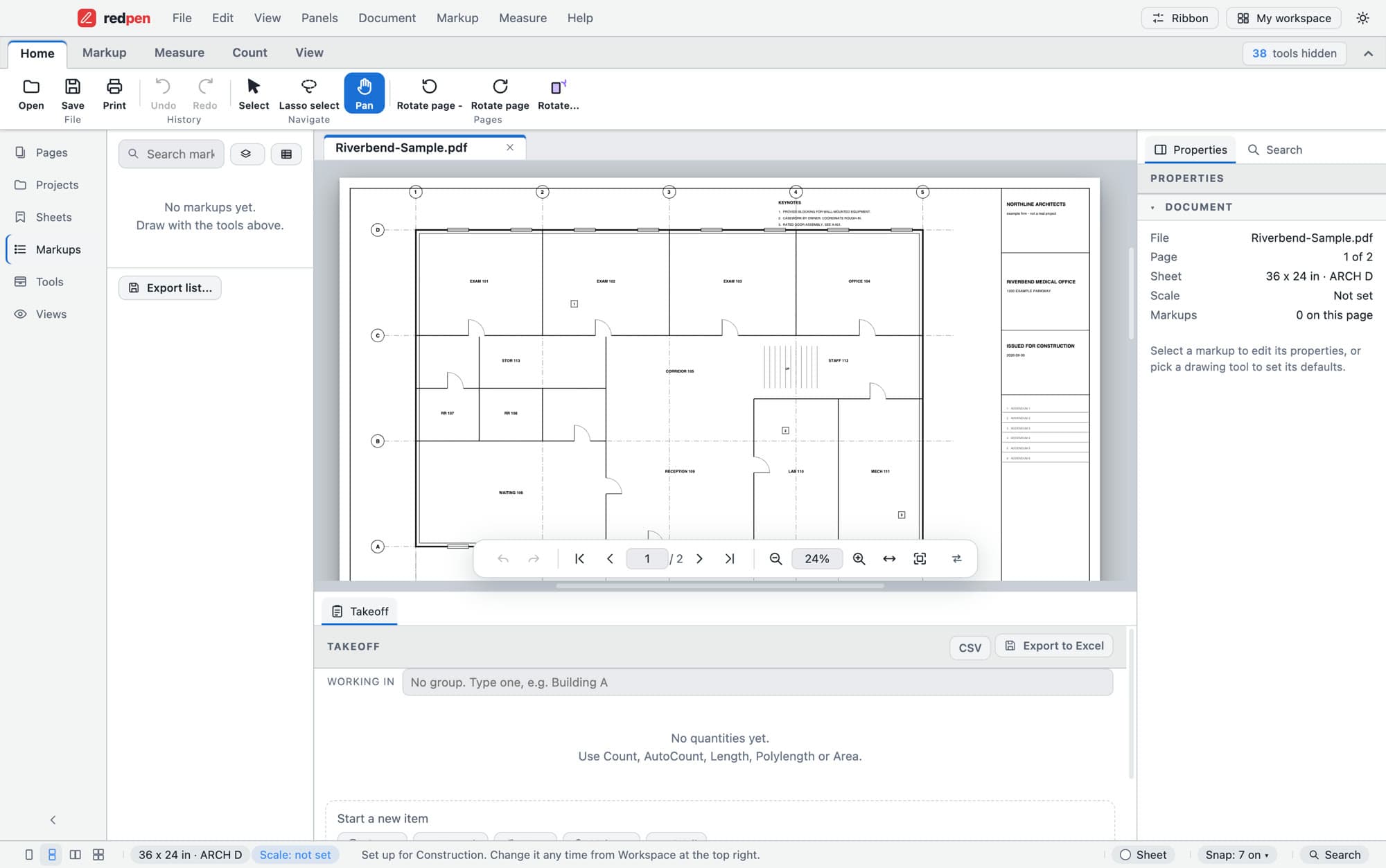
Properties · Riverbend-Sample.pdf - 02
Scale it from the drawing
Autoscale reads the dimension strings and checks them against each other. Here 7 of 7 agree on 1/4" = 1'-0". When they don't agree it says so rather than guessing; you can calibrate from a known length instead.
- Set scale from architectural, engineering and metric presets · Separate X and Y, per page, all pages or a rangePro
- Calibrate from a known lengthPro
- Autoscale · Reads dimension strings and only sets a scale it can verify; otherwise it says soPro
- Scale areas (viewports) for details at another scalePro
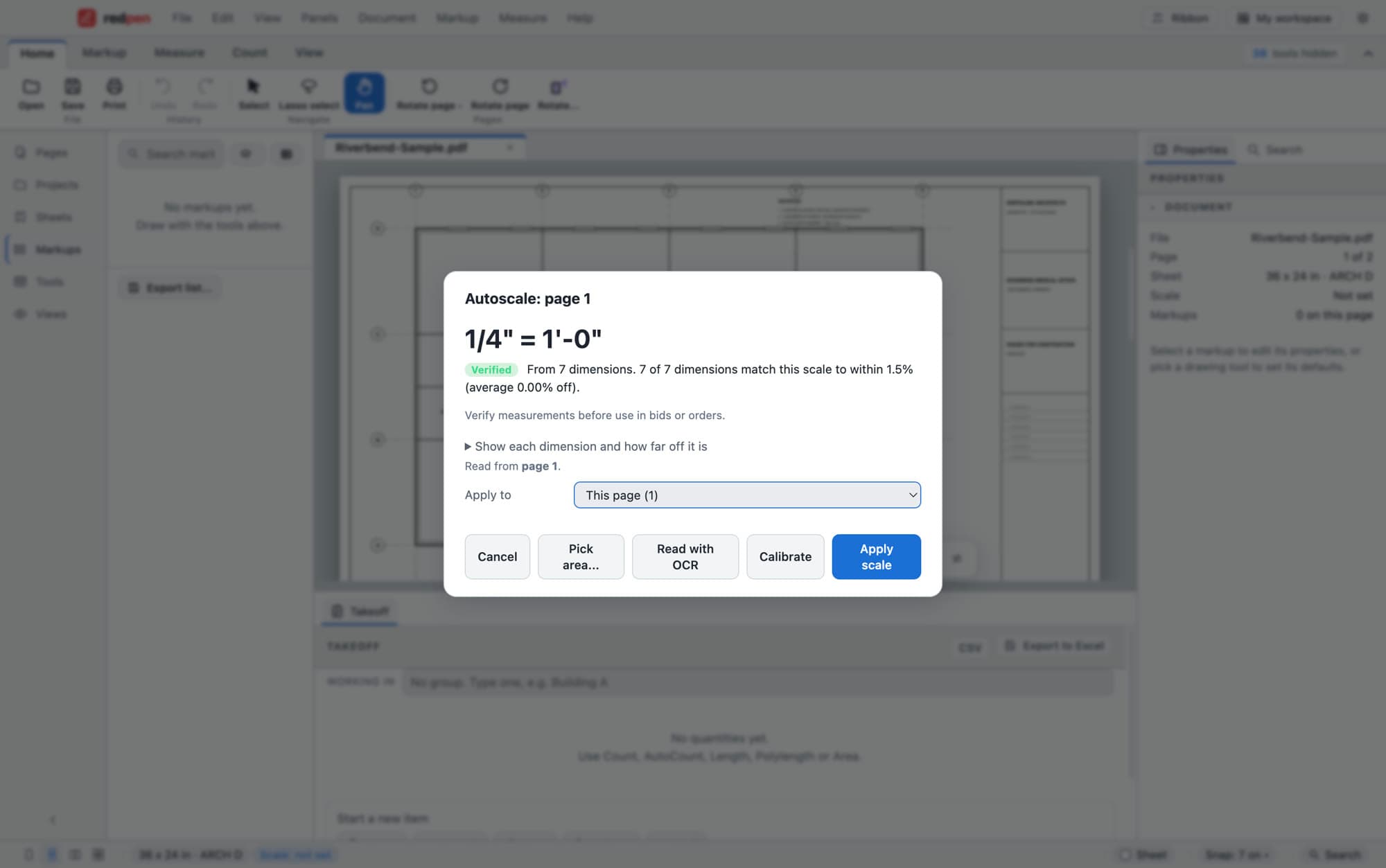
Autoscale · page 1 - 03
Measure it
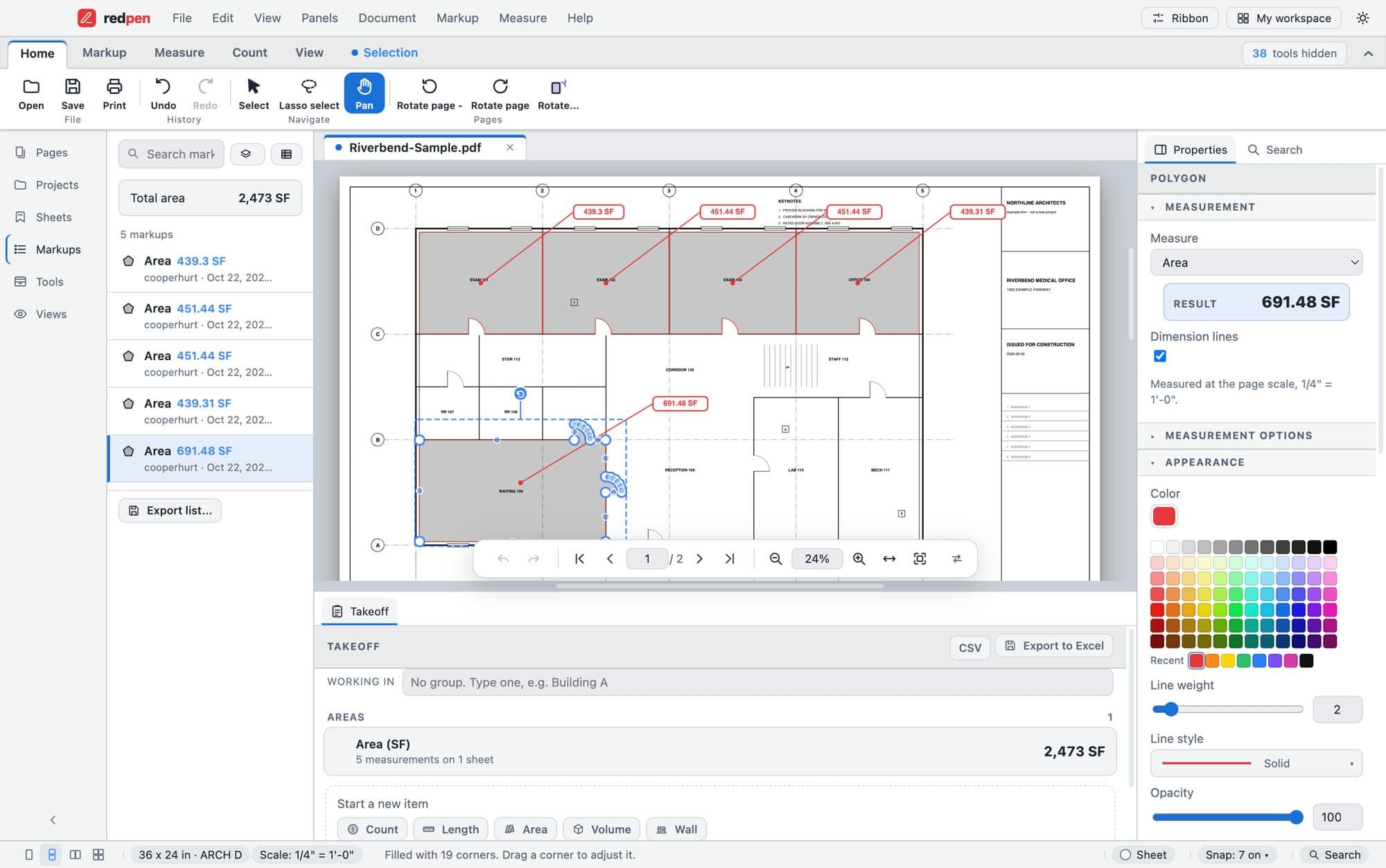
Pick the tool, click the corners, read the result in real units. Dynamic Fill traces a room from one click and turns enclosed holes into cutouts. Snapping, which works on every markup, is free.
- Length and polylengthPro
- PerimeterPro
- Area, with cutouts · Rectangle area and rectangle cutout too; net area never goes negativePro
- Volume · From an area and a depthPro
- Wall area · From a run and a heightPro
- Angle, radius and diameterPro
- Dynamic Fill · Click inside a room; it traces the walls and turns enclosed holes into cutoutsPro
- FootingsPro
- Snapping to ends, midpoints, centres, intersections and more · Works on every markup, and earns its keep when measuringFree
Area · 691.48 SF at 1/4" = 1'-0" - 04
Count it
Count by hand, or pick one symbol and let AutoCount find the matching ones, optionally only inside an area. The markups list totals each type as you go.
- Manual counts · With renumber, verify and find duplicatesPro
- AutoCount · Pick one symbol and it finds the matching ones, optionally only inside an areaPro
- Spaces and zones · Counts and measurements totalled per room or match-line zonePro
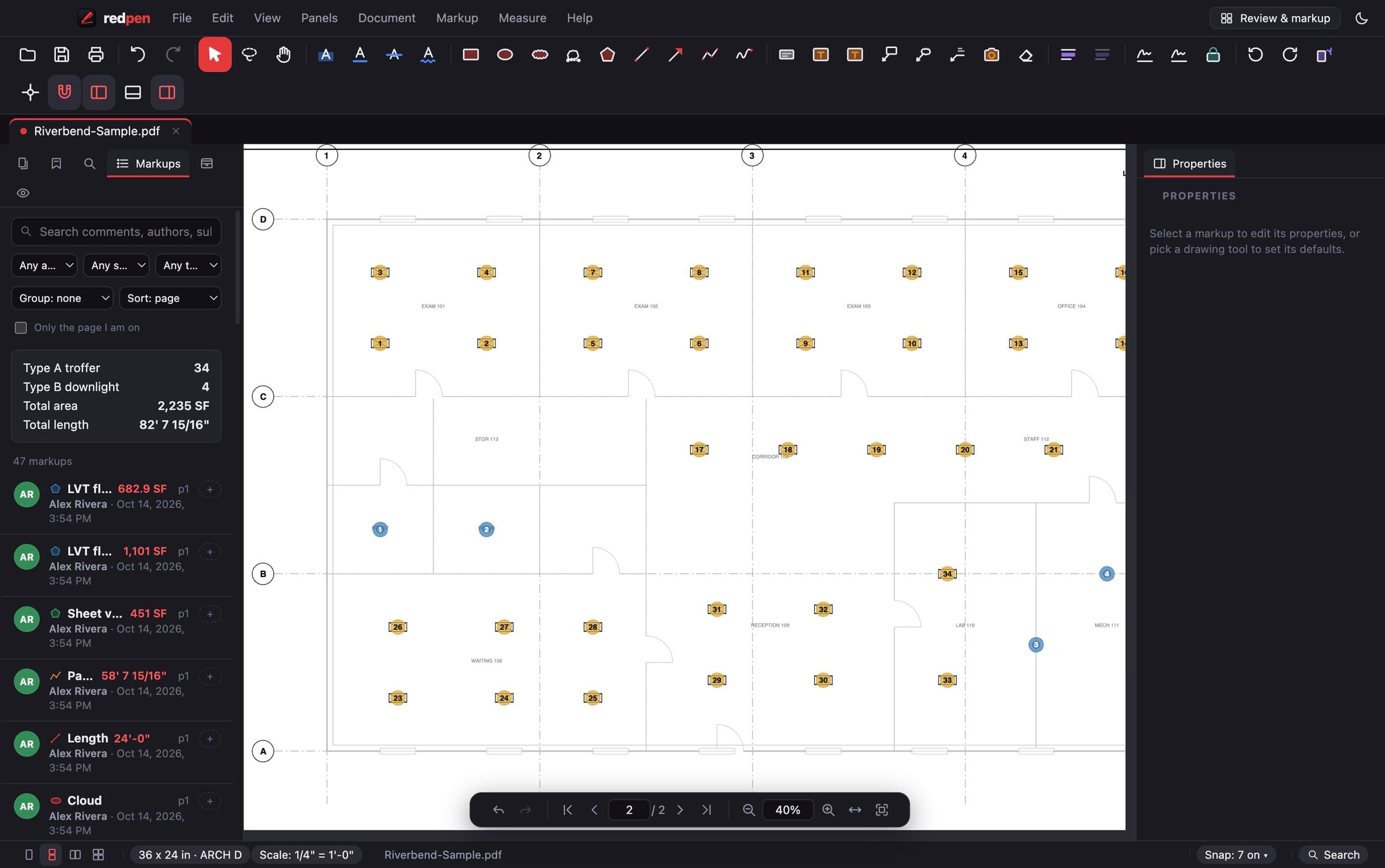
Markups list · counts by type - 05
Send the quantities
Totals by item update in the Takeoff panel as you work. Export to Excel or CSV for the estimate, or place a quantity table on the sheet. The export is a saved file, not a live link: export again when the takeoff changes.
- Quantity table placed on the sheetPro
- Takeoff export to Excel or CSV · A saved file, not a live linkPro
- Running quantities in the Takeoff panel · Totals by item update as you measure and countPro
Takeoff panel · 2,473 SF
Then the addendum lands.
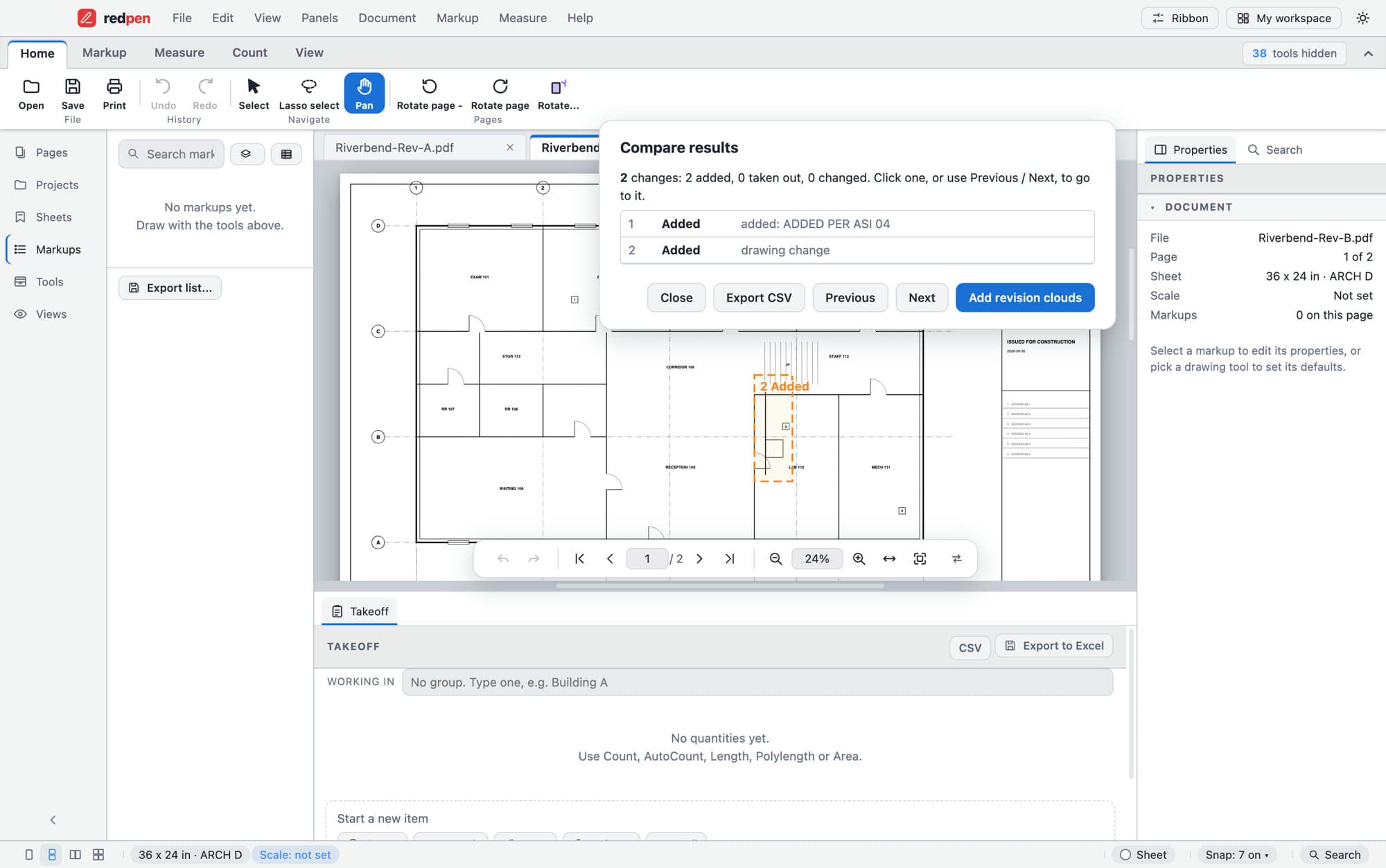
Compare the new issue with the set you priced, so you re-measure what moved and nothing else.
- Set compare · Pairs sheets by number, picks the latest revision, lists what changedPro
- Sheet overlayPro
- Slip sheets · Replace sheets from a new issue; markups carry across when the sheet size matchesPro
- Sheet links · Sheet references on the drawings become linksPro
- Page labels from sheet numbersPro
- Sheet names read from title blocks, Sheets panel and drawing logPro
Comparing a single page with an older version of itself is in the free app. Slip sheets carry your markups across when the sheet size matches.
What it doesn't do.
Said plainly, so nobody finds out on a live bid.
- Autoscale won't guess
- It sets a scale only when it can verify one. Otherwise it says so, and you calibrate from a known length.
- A live link to Excel
- Takeoff and markup lists export to a saved .xlsx or CSV. Slip sheets carry markups across only when the sheet size matches.
- Live review sessions
- You share the PDF. Several people marking up one file at once isn't built.
- DWG or DXF files, CAD and Revit plug-ins
- Redpen works on PDFs. Print or export the drawings to PDF first.
- iPad, phone or browser app
- Redpen is a desktop app for Windows and Mac.
Working with people on other PDF apps? Their markups, measurements and .btx tool sets open in Redpen, with a few small differences. What opens and what doesn't
Which plan does the work.
Scale, measure, count, takeoff and set compare are Pro. The free app opens the set and marks it up.
Free
Open any plan set, any size. Clouds, callouts, text and highlights, the markups list, snapping on every markup, and a page compared with an older version.
Pro
Everything on this page: Autoscale and calibration, every measure tool, counts and AutoCount, takeoff export, set compare, overlay, slip sheets and sheet links.
Team
Pro on every seat, with one invoice, admin and member roles, and seats you add or remove any time.
Office ($79 a year per seat) adds document tools such as OCR, redaction by drawing boxes and digital-ID signing. It does not include scale, measuring or takeoff. Every new account can try Pro free for 14 days, no card. Compare plans
Asked in the trailer.
Can I export takeoff quantities to Excel?
Does it work on the jobsite without a connection?
Does it read DWG or Revit files?
Are the shortcuts familiar?
Can I keep working with people on other PDF apps?
Does it run on a Mac?
Are my files uploaded anywhere?
Try it on the set on your desk.
Download Redpen and open your first PDF in a minute. The free app needs no account. Every new account can try Office or Pro free for 14 days, no card.
Windows & Mac · No credit card · Your files stay on your computer